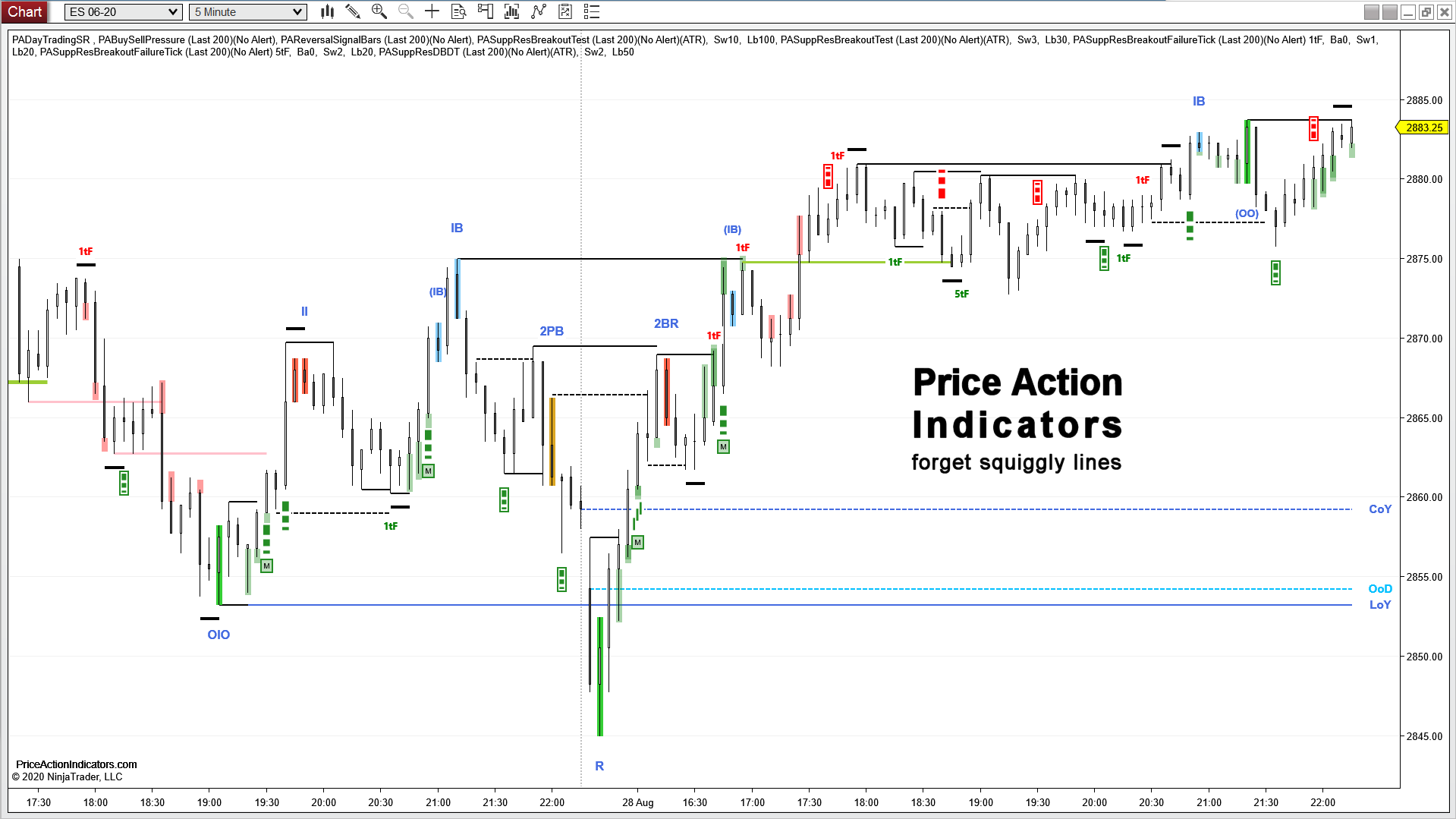
Price Action Reversals
Indicator for NinjaTrader® 8

Every customer with a licence for the Reversal Signal Bars indicator can download the new (standalone) Price Action Reversals indicator and use it as a full licence.
Features
- Shows the following Signal Bars & Patterns
– Multi-Bar Reversal (aka PriceActionRose’s Cave Man reversal)
– Inside Bar
– Reversal Bar (aka Pin Bar, Trap reversal)
– Inside Inside Pattern
– Inside/Outside/Inside Pattern
– Outside/Inside/Outside Pattern
– Two Bar Reversal
– Three Bar Reversal
– Outside/Outside Pattern
– Outside Bar
– Final Flag (impending reversal)
– Entry Bar and Breakout Bar after a reversal signal
– Failed Entry Bar after a reversal signal
– 2nd Entry for a reversal signal
– Double Bottom/Top of reversal signals with prior swing high/low
– Scale In Levels for reversal signals, 50 and 66%
– Target Levels for reversal signals based on initial risk or average bar range
- “Barb Wire” (a special kind of a tight trading range)
- “Breakout Mode” (a special kind of a tight trading range or triangle where the probability of a successful breakout in either direction is approximately 50%)
- Use as a discretionary indicator and for Automated Trading
- Use in NinjaTrader Strategies or Market Analyzer
- Alert feature
- Does not work on HeikenAshi, Kagi, Renko, PointAndFigure and LineBreak charts
Example Charts


Download a 20 day trial version
Every customer with a licence for the Reversal Signal Bars indicator can download the new (standalone) Price Action Reversals indicator and use it as a full licence.
You already paid for that!
Buy now for 280 €
you get redirected to our reseller CopeCart to place your order
to order you need your NinjaTrader® Machine ID (please see FAQ)
for license activation (please see FAQ)
Please contact us for a discount if you’re going to buy more than one indicator.
Reversal Signal Bars and Patterns
A Reversal Signal can be a single candlestick or a pattern that signals a trader that a possible reversal is likely setting up. Sometimes a Signal Bar can be a setup for a trade in either direction.
Read more here: Signal Bars & Patterns
How to enter on a Reversal Signal
There are several ways how to enter a trade on a reversal signal. All have advantages and disadvantages and finally depend on the market context and the trader.
Read more here: Entry Strategies
How to Trade – Reversal Signals
Once a Reversal Signal shows up on the chart place a stop entry buy order one tick above the bar or pattern (for bull). The closest logical stop goes below the bar or pattern – a bar/pattern stop.
Read more here: How to Trade a Reversal Signal
Automated Trading
Price Action Reversals is compatible with BloodHound from SharkIndicators or can be used in the Market Analyzer/Strategy Builder of NinjaTrader. You can call it as well from your own NinjaTrader indicators or strategies.
Please refer to the Plots at the end of the page.
Can I simply trade every Reversal Signal?
This largely depends on context, trading style and stop loss (e.g. using a wider stop, than a bar stop), also on your ability to scale in. Please check out this separate post about Reversals. Also check out the Blog for more examples on how to use Reversal Signal Bars in your trading.
Confluence is very important in trading and means to have several (at least two) reasons to take a trade. Your 1st reason is the reversal signal bar/pattern and your 2nd reason can be e.g. support at HOY/LOY/COY, measured moves, trend lines / trend channel line overshoots, Buying/Selling Pressure, Tick Failure Breakouts, Breakout Tests, a 2nd attempt to reverse and many more.


What are the Settings?
If you trade the MES, load the indicator on the ES chart (the volume is much larger) and take the trades on the MES with the price from the ES contract. MES over/undershoots.
Indicator name: PriceActionReversals
(all Price Action Indicators are in the “PriceActionIndicators” folder)
 |
|
 |
Signal BarsEnable or disable to show the different Reversal Signal Bars or Patterns Please refer here for Signal Bars. Multi-Bar Reversal (MBR)
|
 |
|
 |
|
 |
|
Plots
The Price Action Reversals indicator is compatible with BloodHound from SharkIndicators or can be used in the Market Analyzer/Strategy Builder of NinjaTrader. You can call it as well from your own NinjaTrader indicators or strategies. It exposes the following plots:
| Plots | Value | Description |
| RVB | +1 / -1 | Bull reversal signal ( +1 ) Bear reversal signal ( -1 ) |
| II_Dot | <Double> | below or above the Inside Inside signal |
| EntryBar | +1 / -1 | Entry Bar after a Bull reversal signal ( +1 ) Entry Bar after a Bear reversal signal ( -1 ) |
| BreakoutBar | +n / -n | Breakout after a Bull reversal signal ( +n bars later ) Breakout after a Bear reversal signal ( -n bars later ) |
| Entry2nd | +n / -n | 2nd Entry for a Bull reversal signal ( +n bars later ) 2nd Entry for a Bear reversal signal ( -n bars later ) |
| EntryFailed | +1 / -1 | Failed Entry Bar after a Bull reversal signal ( -1 ) Failed Entry Bar after a Bear reversal signal ( +1 ) |
| StopEntry | <Double> | one tick beyond the extreme of the reversal signal |
| Stop | <Double> | one tick beyond the other extreme of the reversal signal |
| ScaleIn1 | <Double> | 50% pullback into the range of the reversal signal |
| ScaleIn2 | <Double> | 66% pullback into the range of the reversal signal |
| Target1 | <Double> | based on the settings for IR or ABR (see above) |
| Target2 | <Double> | based on the settings for IR or ABR (see above) |
| BarbWire | +1 | BarbWire Pattern |
| BOMode | +1 | Breakout Mode Pattern |